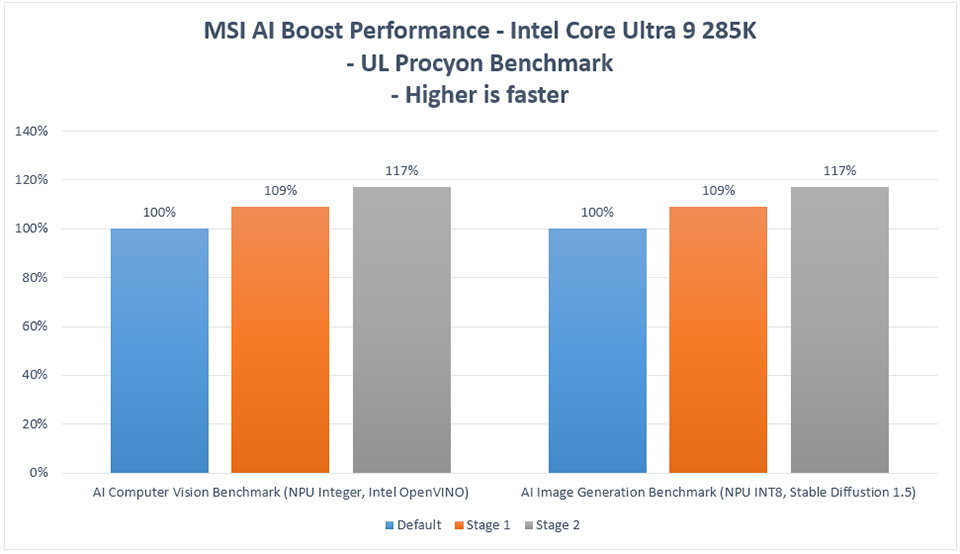
MSI AI Boost Meningkatkan Performa AI Intel Core Ultra 9 285K hingga 17%.
Motherboards
Prosesor Intel Core Ultra 200S series dilengkapi dengan Neural Processing Unit (NPU) yang dirancang untuk menangani beban kerja AI secara efisien. Untuk lebih meningkatkan performa komputasi AI, MSI memperkenalkan fitur AI Boost, yang dapat diaktifkan melalui BIOS.
MSI AI Boost menawarkan tiga mode performa: Stage 1, Stage 2, dan Stage 3, yang memungkinkan pengguna memilih mode optimal berdasarkan kemampuan prosesor mereka.
Sebagai contoh, saat diuji dengan Intel Core Ultra 9 285K menggunakan alat benchmark UL Procyon AI, performa NPU meningkat sekitar 9% pada mode Stage 1 dan hingga 17% pada mode Stage 2.
How to Enable MSI AI Boost
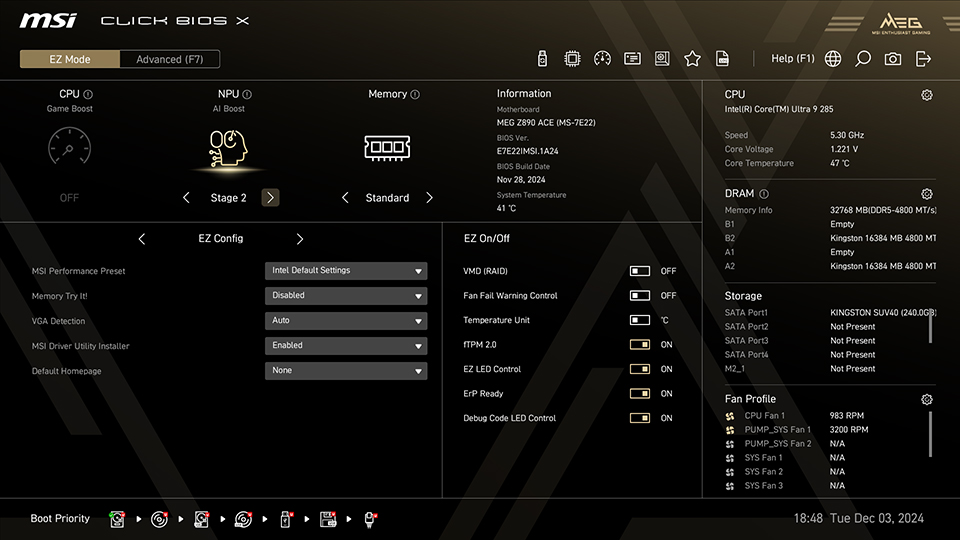
Cukup akses MSI Click BIOS X di Mode EZ dan pilih mode MSI AI Boost yang diinginkan dari opsi AI Boost di bagian atas layar.
Test System:
CPU: Intel Core Ultra 9 285K
Motherboard: MSI MEG Z890 ACE
Memory: Kingston FURY Beast DDR5-4800 16GBx2
Graphics Card: MSI GeForce RTX 4090 SUPRIM X 24G
SSD: Kingston SNV2S/2000G
CPU Cooler: MSI MAG CORELIQUID I360
Power Supply: MSI MEG Ai1300P PCIE5
Operating System: Windows 11 Pro 24H2, build 26100.2314
CPU: Intel Core Ultra 9 285K
Motherboard: MSI MEG Z890 ACE
Memory: Kingston FURY Beast DDR5-4800 16GBx2
Graphics Card: MSI GeForce RTX 4090 SUPRIM X 24G
SSD: Kingston SNV2S/2000G
CPU Cooler: MSI MAG CORELIQUID I360
Power Supply: MSI MEG Ai1300P PCIE5
Operating System: Windows 11 Pro 24H2, build 26100.2314
Catatan: Mengaktifkan MSI AI Boost melibatkan overclocking, yang dapat mempengaruhi stabilitas sistem.
Motherboard MSI Z890: https://id.msi.com/Landing/intel-arrow-lake-core-ultra-z890-b860-h810-best-ai-pc-gaming-motherboard.