PCIe Lane Bifurcation dan Bandwidth Sharing pada Motherboard MSI X870E / X870
Motherboards
Dalam sistem komputer, jalur PCIe disediakan oleh prosesor dan chipset untuk mendukung berbagai komponen. Untuk memaksimalkan efisiensi penggunaan jalur tersebut dan mendukung beragam perangkat, produsen motherboard sering kali merancang board mereka agar komponen seperti slot PCIe, slot SSD M.2, dan port USB4 dapat berbagi bandwidth PCIe.
Meskipun pendekatan ini memberikan fleksibilitas yang lebih besar, hal ini juga dapat menambah kompleksitas dan membingungkan bagi sebagian pengguna. Untuk membantu memperjelas hal tersebut, kami telah merangkum gambaran lengkap mengenai konfigurasi PCIe lane bifurcation dan bandwidth sharing pada motherboard MSI X870E dan X870.
MEG X870E GODLIKE
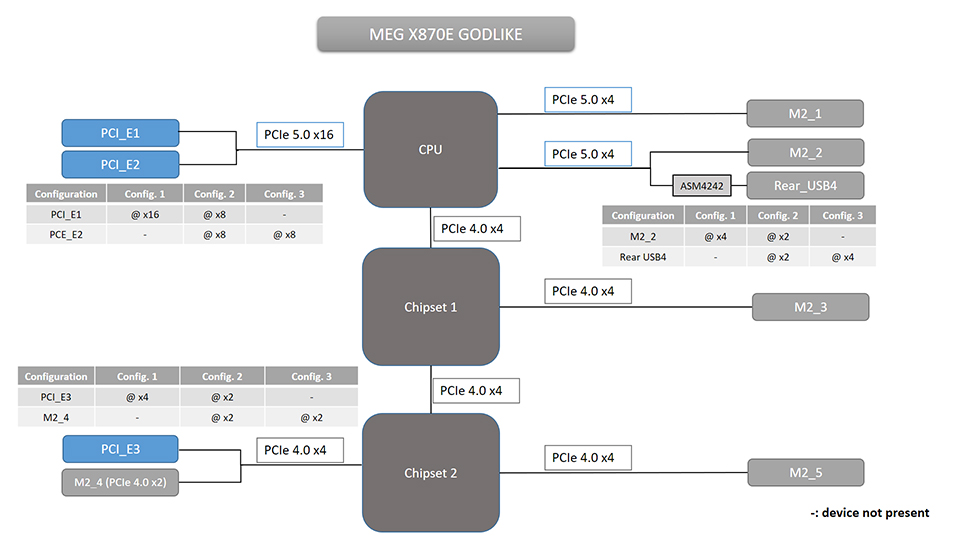
Spesifikasi PCIe / M.2 / USB4 dan Gambaran Umum Lane Sharing
Berikut adalah rincian lengkap untuk setiap slot dan port, termasuk jenis koneksi, kecepatan yang didukung, serta konfigurasi pembagian bandwidth (jika ada).
Slot / Port
Connected to
Speed Supported
Shares Bandwidth With
PCI_E1
CPU
Up to PCIe 5.0 x16
PCI_E2
PCI_E2
CPU
Up to PCIe 5.0 x8
PCI_E1
PCI_E3
Chipset
Up to PCIe 4.0 x4
M2_4
USB4
CPU
Up to PCIe 5.0 x4
M2_2
M2_1
CPU
Up to PCIe 5.0 x4
No
M2_2
CPU
Up to PCIe 5.0 x4
USB4
M2_3
Chipset
Up to PCIe 4.0 x4
No
M2_4
Chipset
Up to PCIe 4.0 x2
PCI_E3
M2_5
Chipset
Up to PCIe 4.0 x4
No
PCIe Lane Sharing Notes:
- Slot PCI_E1 dan PCI_E2 berbagi jalur PCIe 5.0 x16 dari CPU.
- Slot PCI_E3 dan M2_4 berbagi jalur PCIe 4.0 x4 dari chipset.
- Slot M2_2 dan port USB4 belakang berbagi jalur PCIe 5.0 x4 dari CPU.
Dukungan PCIe Lane Bifurcation di BIOS
Anda dapat mengonfigurasi pengaturan PCIe lane bifurcation melalui BIOS.
Slot
Bifurcation
PCI_E1 (CPU)
x16, or x8+x8, or x8+x4+x4, or x4+x4+x4+x4
MPG X870E CARBON WIFI
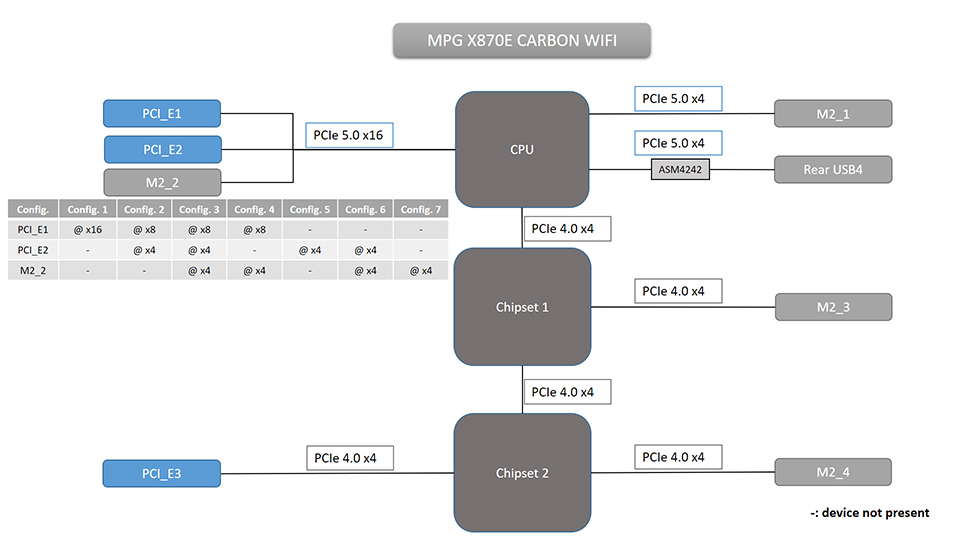
Spesifikasi PCIe / M.2 / USB4 dan Gambaran Umum Lane Sharing
Slot / Port
Connected to
Speed Supported
Shares Bandwidth With
PCI_E1
CPU
Up to PCIe 5.0 x16
PCI_E2 & M2_2
PCI_E2
CPU
Up to PCIe 5.0 x4
PCI_E1 & M2_2
PCI_E3
Chipset
Up to PCIe 4.0 x4
No
USB4
CPU
Up to PCIe 5.0 x4
No
M2_1
CPU
Up to PCIe 5.0 x4
No
M2_2
CPU
Up to PCIe 5.0 x4
PCI_E1 & PCI_E2
M2_3
Chipset
Up to PCIe 4.0 x4
No
M2_4
Chipset
Up to PCIe 4.0 x4
No
PCIe Lane Sharing Notes:
- Slot PCI_E1, PCI_E2, dan M2_2 berbagi jalur PCIe 5.0 x16 dari CPU.
Slot
Bifurcation
PCI_E1 (CPU)
x16, or x8+x8, or x8+x4+x4, or x4+x4+x4+x4
MAG X870E TOMAHAWK WIFI
Spesifikasi PCIe / M.2 / USB4 dan Gambaran Umum Lane Sharing
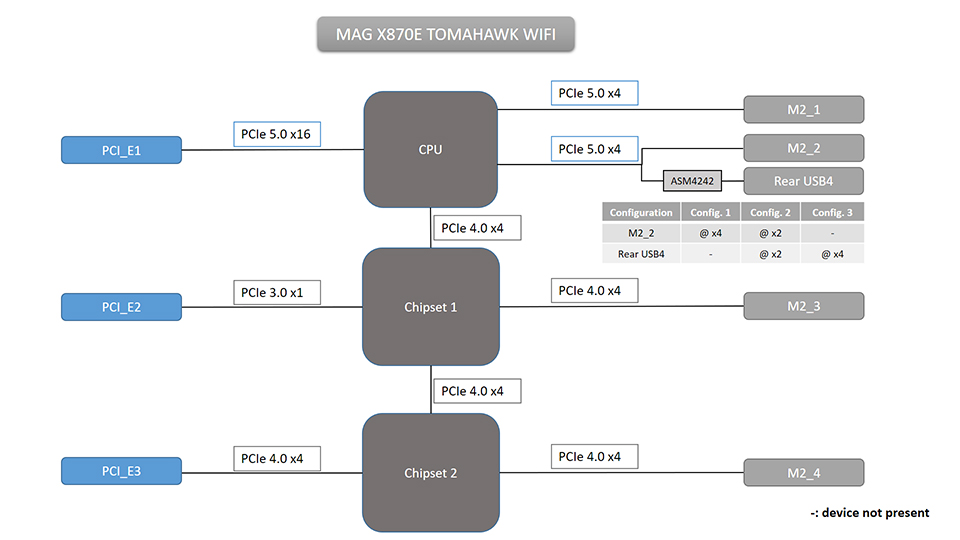
Slot / Port
Connected to
Speed Supported
Shares Bandwidth With
PCI_E1
CPU
Up to PCIe 5.0 x16
No
PCI_E2
Chipset
Up to PCIe 3.0 x1
No
PCI_E3
Chipset
Up to PCIe 4.0 x4
No
USB4
CPU
Up to PCIe 5.0 x4
M2_2
M2_1
CPU
Up to PCIe 5.0 x4
No
M2_2
CPU
Up to PCIe 5.0 x4
USB4
M2_3
Chipset
Up to PCIe 4.0 x4
No
M2_4
Chipset
Up to PCIe 4.0 x4
No
PCIe Lane Sharing Notes:
- M2_2 dan port USB4 belakang berbagi jalur PCIe 5.0 x4 dari CPU.
Slot
Bifurcation
PCI_E1 (CPU)
x16, or x8+x8, or x8+x4+x4, or x4+x4+x4+x4
MAG X870 TOMAHAWK WIFI
Spesifikasi PCIe / M.2 / USB4 dan Gambaran Umum Lane Sharing
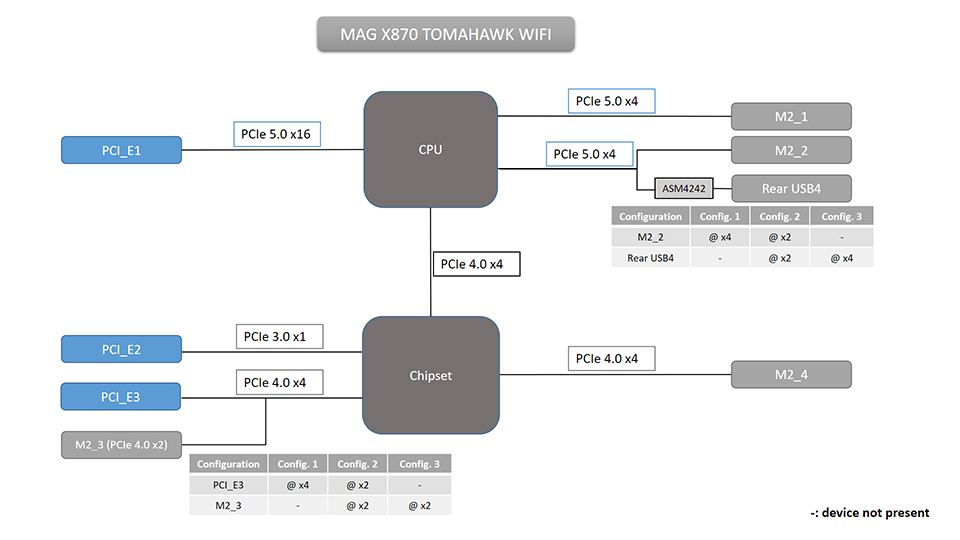
Slot / Port
Connected to
Speed Supported
Shares Bandwidth With
PCI_E1
CPU
Up to PCIe 5.0 x16
No
PCI_E2
Chipset
Up to PCIe 3.0 x1
No
PCI_E3
Chipset
Up to PCIe 4.0 x4
M2_3
USB4
CPU
Up to PCIe 5.0 x4
M2_2
M2_1
CPU
Up to PCIe 5.0 x4
No
M2_2
CPU
Up to PCIe 5.0 x4
USB4
M2_3
Chipset
Up to PCIe 4.0 x2
PCI_E3
M2_4
Chipset
Up to PCIe 4.0 x4
No
PCIe Lane Sharing Notes:
- M2_2 dan USB4 belakang berbagi jalur PCIe 5.0 x4 dari CPU.
- PCI_E3 dan M2_3 berbagi jalur PCIe 4.0 x4 dari chipset.
Dukungan bifurkasi jalur PCIe tersedia di BIOS
Slot
Bifurcation
PCI_E1 (CPU)
x16, or x8+x8, or x8+x4+x4, or x4+x4+x4+x4
X870E GAMING PLUS WIFI
Spesifikasi PCIe / M.2 / USB4 dan Gambaran Umum Lane Sharing
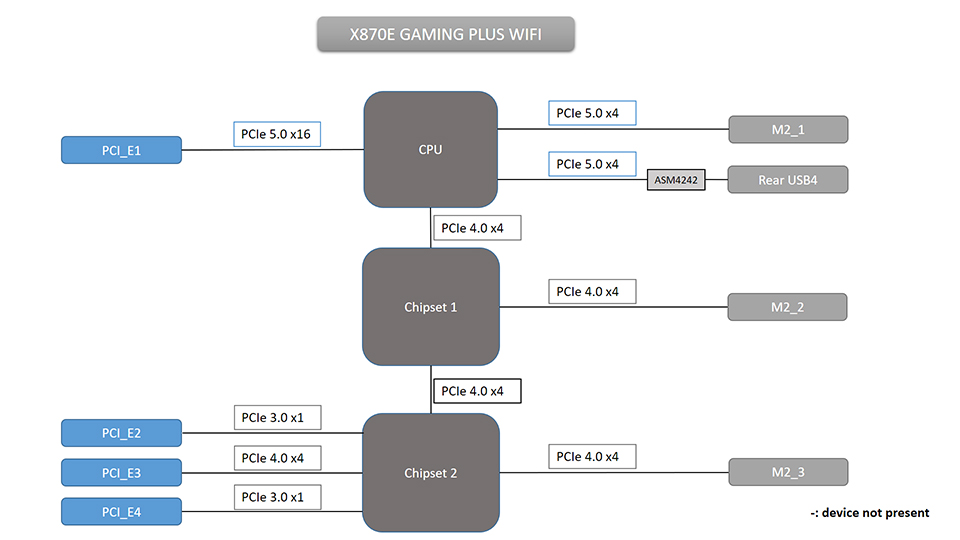
Slot / Port
Connected to
Speed Supported
Shares Bandwidth With
PCI_E1
CPU
Up to PCIe 5.0 x16
No
PCI_E2
Chipset
Up to PCIe 3.0 x1
No
PCI_E3
Chipset
Up to PCIe 4.0 x4
No
PCI_E4
Chipset
Up to PCIe 3.0 x1
No
USB4
CPU
Up to PCIe 5.0 x4
No
M2_1
CPU
Up to PCIe 5.0 x4
No
M2_2
Chipset
Up to PCIe 4.0 x4
No
M2_3
Chipset
Up to PCIe 4.0 x4
No
Dukungan Bifurkasi Jalur PCIe di BIOS
Slot
Bifurcation
PCI_E1 (CPU)
x16, or x8+x8, or x8+x4+x4, or x4+x4+x4+x4
X870 GAMING PLUS WIFI
Spesifikasi PCIe / M.2 / USB4 dan Gambaran Umum Lane Sharing
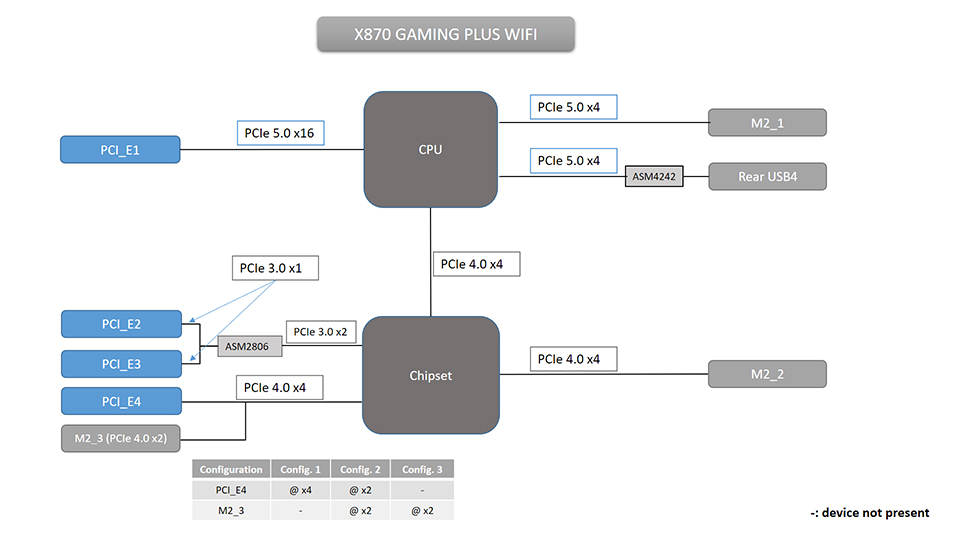
Slot / Port
Connected to
Speed Supported
Shares Bandwidth With
PCI_E1
CPU
Up to PCIe 5.0 x16
No
PCI_E2
Chipset
Up to PCIe 3.0 x1
No
PCI_E3
Chipset
Up to PCIe 3.0 x1
No
PCI_E4
Chipset
Up to PCIe 4.0 x4
M2_3
USB4
CPU
Up to PCIe 5.0 x4
No
M2_1
CPU
Up to PCIe 5.0 x4
No
M2_2
Chipset
Up to PCIe 4.0 x4
No
M2_3
Chipset
Up to PCIe 4.0 x2
PCI_E4
Catatan Pembagian Jalur PCIe:
- PCI_E4 dan M2_3 berbagi jalur PCIe 4.0 x4 dari chipset.
Dukungan Bifurkasi Jalur PCIe di BIOS
Slot
Bifurcation
PCI_E1 (CPU)
x16, or x8+x8, or x8+x4+x4, or x4+x4+x4+x4
PRO X870E-P WIFI
Spesifikasi PCIe / M.2 / USB4 dan Gambaran Umum Lane Sharing
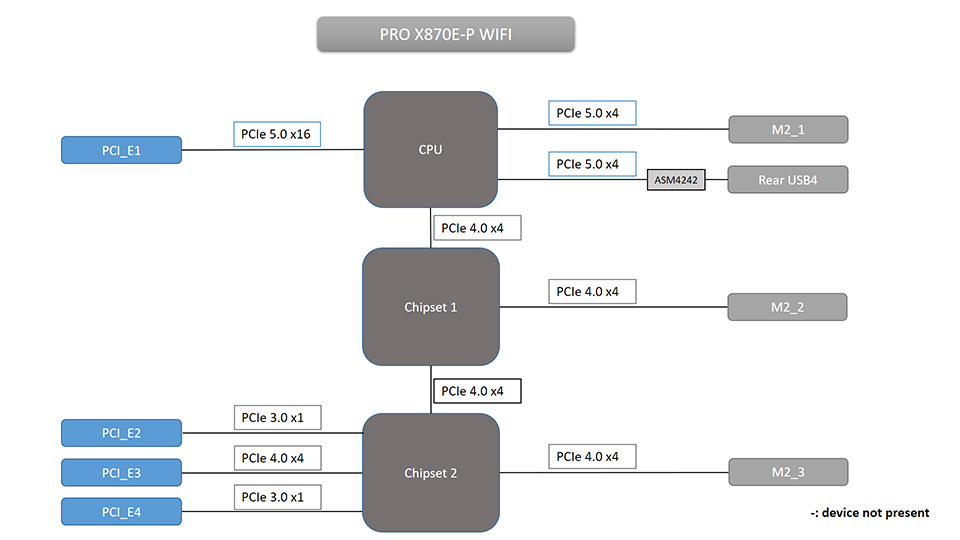
Slot / Port
Connected to
Speed Supported
Shares Bandwidth With
PCI_E1
CPU
Up to PCIe 5.0 x16
No
PCI_E2
Chipset
Up to PCIe 3.0 x1
No
PCI_E3
Chipset
Up to PCIe 4.0 x4
No
PCI_E4
Chipset
Up to PCIe 3.0 x1
No
USB4
CPU
Up to PCIe 5.0 x4
No
M2_1
CPU
Up to PCIe 5.0 x4
No
M2_2
Chipset
Up to PCIe 4.0 x4
No
M2_3
Chipset
Up to PCIe 4.0 x4
No
Dukungan Bifurkasi Jalur PCIe di BIOS
Slot
Bifurcation
PCI_E1 (CPU)
x16, or x8+x8, or x8+x4+x4, or x4+x4+x4+x4
PRO X870-P WIFI
Spesifikasi PCIe / M.2 / USB4 dan Gambaran Umum Lane Sharing
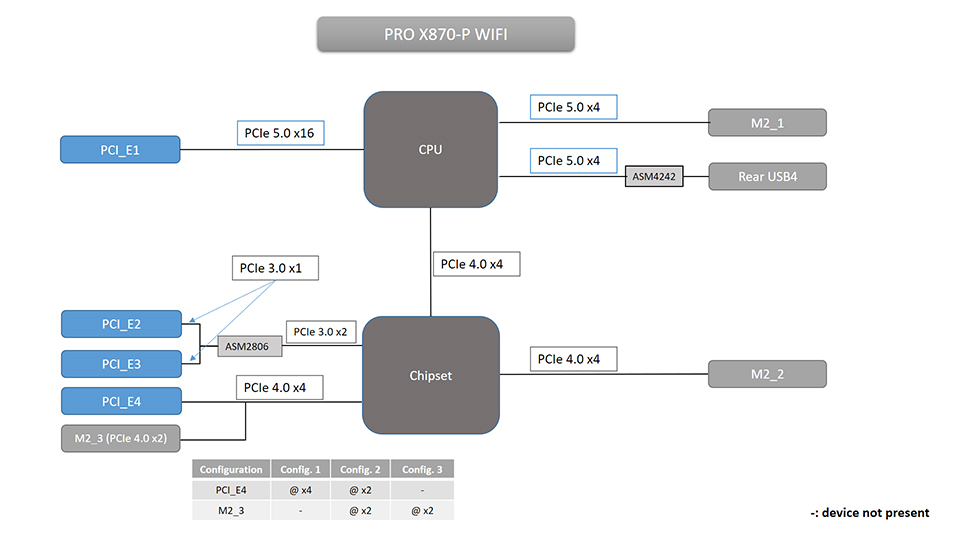
Slot / Port
Connected to
Speed Supported
Shares Bandwidth With
PCI_E1
CPU
Up to PCIe 5.0 x16
No
PCI_E2
Chipset
Up to PCIe 3.0 x1
No
PCI_E3
Chipset
Up to PCIe 3.0 x1
No
PCI_E4
Chipset
Up to PCIe 4.0 x4
M2_3
USB4
CPU
Up to PCIe 5.0 x4
No
M2_1
CPU
Up to PCIe 5.0 x4
No
M2_2
Chipset
Up to PCIe 4.0 x4
No
M2_3
Chipset
Up to PCIe 4.0 x2
PCI_E4
Catatan Pembagian Jalur PCIe:
- PCI_E4 dan M2_3 berbagi jalur PCIe 4.0 x4 dari chipset.
Dukungan Bifurkasi Jalur PCIe di BIOS
Slot
Bifurcation
PCI_E1 (CPU)
x16, or x8+x8, or x8+x4+x4, or x4+x4+x4+x4
Catatan:
Konfigurasi di atas berlaku saat menggunakan prosesor AMD Ryzen 7000 dan Ryzen 9000 Series. Untuk batasan pada prosesor Ryzen 8000 Series, silakan merujuk ke halaman produk motherboard yang bersangkutan
.
Motherboard Gaming MSI X870E/X870/B850/B840: https://id.msi.com/Landing/amd-am5-x870e-x870-b850-b840-ryzen-9000-x3d-best-ai-gaming-motherboard